November 9, 2005
MSN Sandbox !!!
Guys check this out, Microsoft’s MSN sandbox (that’s how they called it), new MSN technologies, prototypes and many more. It’s really cool!! http://sandbox.msn.com/

November 7, 2005
System.Net.Mail
Seems to me that Microsoft has deprecated the System.Web.Mail, & replaced it with the System.Net.Mail. When I try to send an email using the System.Web.Mail it gives the message obsolete with a warning. Below is the code sample for sending simple SMTP emails with .NET 2.0.
public void SendEmail()
{
//.Net 1.0 System.Web.Mail -- Is now Depre
/*
//We can use the constructor as well; e.g.
/*MailMessage mail = new MailMessage("ludmal@test.com", "ludmal@tst.lk", "Test", "test");*/
MailMessage mail = new MailMessage();
mail.To = "ludmal@e-solutions.lk";
mail.From = "ludmal@test.com";
mail.Body = "Body Testing";
SmtpMail.SmtpServer = "mail";
SmtpMail.Send(mail);
*/
//.Net 2.0 System.Net.Mail
MailMessage mail = new MailMessage("ludmal@test.com", "ludmal@tst.lk", "Test", "test");
/*MailAddressCollection col = new MailAddressCollection();
MailAddress sendAdd = new MailAddress("ludmal@e-solutions.lk");
*/
System.Net.Mail.SmtpClient client = new SmtpClient("mysmtp");
client.Send(mail);
}
public void SendEmail()
{
//.Net 1.0 System.Web.Mail -- Is now Depre
/*
//We can use the constructor as well; e.g.
/*MailMessage mail = new MailMessage("ludmal@test.com", "ludmal@tst.lk", "Test", "test");*/
MailMessage mail = new MailMessage();
mail.To = "ludmal@e-solutions.lk";
mail.From = "ludmal@test.com";
mail.Body = "Body Testing";
SmtpMail.SmtpServer = "mail";
SmtpMail.Send(mail);
*/
//.Net 2.0 System.Net.Mail
MailMessage mail = new MailMessage("ludmal@test.com", "ludmal@tst.lk", "Test", "test");
/*MailAddressCollection col = new MailAddressCollection();
MailAddress sendAdd = new MailAddress("ludmal@e-solutions.lk");
*/
System.Net.Mail.SmtpClient client = new SmtpClient("mysmtp");
client.Send(mail);
}
November 4, 2005
Google's new RSS Reader
Google’s new RSS Feed reader. It gives you the complete power of ajax. Try it here http://www.google.com/reader/lens/ .
November 3, 2005
Socket Programming using .Net 2.0 System.Net.Socket
Socket is a communication mechanism where we use to connect client and the server. Basically the Server will listen to the client connections on specific port number. A client can connect to the Server by using the relevant hostname and the port number. Upon the successful client connection server will gets a new socket bound to a different port. It needs the original socket for listen to other client connections while communicating with the connected client. Below is the simple client /server example done using the .Net 2.0. Review the code & you will find it interesting. (I made it very simple to make you understand) You can modify the code to meet your needs.
Server Code:
class MyServer
{
//Listing to the client connections.
public void Listen()
{
byte[] ipArray = new byte[4];
ipArray[0] = 127;
ipArray[1] = 0;
ipArray[2] = 0;
ipArray[3] = 1;
IPAddress add = new IPAddress(ipArray);
//This is obselete in .Net 2.0
//TcpListener tcpListener = new TcpListener(10);
TcpListener tcpListener = new TcpListener(add, 10);
tcpListener.Start();
Socket socketForClient = tcpListener.AcceptSocket();
if (socketForClient.Connected)
{
Util.Out("client connected..");
NetworkStream netStream = new NetworkStream(socketForClient);
StreamWriter writer = new StreamWriter(netStream);
StreamReader reader = new StreamReader(netStream);
string str = "Message from Server : " + DateTime.Now.ToLongDateString();
writer.WriteLine(str);
Util.Out("What meessage do you want to send to client?");
writer.WriteLine(Console.ReadLine());
writer.Flush();
str = reader.ReadLine();
Util.Out(str);
reader.Close();
writer.Close();
netStream.Close();
}
socketForClient.Close();
Util.Out("Exiting...");
}
}
Client Code :
public class MyClient
{
//Connects to the server
public void Connect()
{
TcpClient socketForServer = null;
try
{
socketForServer = new TcpClient("localhost", 10);
Util.Out("Connected to the Server");
}
catch
{
Util.Out("Failed to connecto localhost");
Util.Out("Exiting..");
return;
}
NetworkStream netstream = socketForServer.GetStream();
StreamReader reader = new StreamReader(netstream);
StreamWriter writer = new StreamWriter(netstream);
try
{
string output1, output2;
output1 = reader.ReadLine();
output2 = reader.ReadLine();
Util.Out(output1);
Util.Out(output2);
writer.Flush();
reader.Close();
}
catch
{
Util.Out("Exception Occured! Exiting...");
}
netstream.Close();
}
}
This is small helper class…
public class Util
{
public static void Out(string s)
{
Console.WriteLine(s);
}
}
This is a simple console application. You can create two console application one for the server & one for the client. Run the server first then client app. If you want you can create nice windows applications using this two simple classes to communicate over network.
Server Code:
class MyServer
{
//Listing to the client connections.
public void Listen()
{
byte[] ipArray = new byte[4];
ipArray[0] = 127;
ipArray[1] = 0;
ipArray[2] = 0;
ipArray[3] = 1;
IPAddress add = new IPAddress(ipArray);
//This is obselete in .Net 2.0
//TcpListener tcpListener = new TcpListener(10);
TcpListener tcpListener = new TcpListener(add, 10);
tcpListener.Start();
Socket socketForClient = tcpListener.AcceptSocket();
if (socketForClient.Connected)
{
Util.Out("client connected..");
NetworkStream netStream = new NetworkStream(socketForClient);
StreamWriter writer = new StreamWriter(netStream);
StreamReader reader = new StreamReader(netStream);
string str = "Message from Server : " + DateTime.Now.ToLongDateString();
writer.WriteLine(str);
Util.Out("What meessage do you want to send to client?");
writer.WriteLine(Console.ReadLine());
writer.Flush();
str = reader.ReadLine();
Util.Out(str);
reader.Close();
writer.Close();
netStream.Close();
}
socketForClient.Close();
Util.Out("Exiting...");
}
}
Client Code :
public class MyClient
{
//Connects to the server
public void Connect()
{
TcpClient socketForServer = null;
try
{
socketForServer = new TcpClient("localhost", 10);
Util.Out("Connected to the Server");
}
catch
{
Util.Out("Failed to connecto localhost");
Util.Out("Exiting..");
return;
}
NetworkStream netstream = socketForServer.GetStream();
StreamReader reader = new StreamReader(netstream);
StreamWriter writer = new StreamWriter(netstream);
try
{
string output1, output2;
output1 = reader.ReadLine();
output2 = reader.ReadLine();
Util.Out(output1);
Util.Out(output2);
writer.Flush();
reader.Close();
}
catch
{
Util.Out("Exception Occured! Exiting...");
}
netstream.Close();
}
}
This is small helper class…
public class Util
{
public static void Out(string s)
{
Console.WriteLine(s);
}
}
This is a simple console application. You can create two console application one for the server & one for the client. Run the server first then client app. If you want you can create nice windows applications using this two simple classes to communicate over network.
November 2, 2005
C# 2.0 : String comparison
While i was reading some of the msdn blogs i found a nice article about string comparison in C# 2.0. Just have a look and it might be helpful to you. http://blogs.msdn.com/abhinaba/archive/2005/11/02/488041.aspx
Class diagrams in VS 2005
One of the loving features of mine in VS 2005 is class diagrams. The ability to draw class diagrams and the same time it will generate the code for us and vice-versa. Once you done the development you can simply generate the class diagram by right clicking on the Project > View Class Diagram. If you want to export the diagram as an image, right click on the diagram and select Export Diagram as Image. Below is the sample diagram I created using VS 2005 .
.
 .
.
October 31, 2005
GMail Drive
You can download it from http://www.viksoe.dk/code/gmail.htm
October 28, 2005
Creating a Screen Saver with Visual Studio 2005
With VS 2005 it’s possible. You can create your own screen saver without any coding. I will explain the basic steps to create your screen saver in minutes. Of course you will get the complete help info from the VS itself. So lets start your RSS feed screen saver.
Open the VS 2005, File > New > Project
New project dialog box will appear. Select the Starter Kits > Screen Saver Starter Kit
Click ok. You can go ahead and change the code for your requirements or else you can keep the default. Build the project & go to the project BIN folder. You will find ssNews.scr file in it. Copy & Paste the file into the %SystemRoot%\system32\ folder.(e.g. WINNT\system32\) Your done!. Great VS has created screen saver for you in just seconds. Select the screen saver (News) from the Screen saver tab from the Display settings & change the RSS feed from the Screen Saver Settings. You can customize the background picture / RSS feed / shortcut keys... whatever since we got the source code. So try it & have fun.
October 19, 2005
I'm @ TechEd
It’s been some time that I couldn’t post anything in my blog bocoz of the tight schedule I had. Tech Ed was really great event especially for us as .net developers. There are loads of things to come from the next release of VS 2005 & SQL 2005. What Microsoft is trying to do is to cut down the development time & to focus more on the business requirements. There were some really good sessions about the Yukon 
(Im at teched with my very good old friend Sumudu)

(Im at teched with my very good old friend Sumudu)
October 11, 2005
TechEd ! im sponsered :-)
Im sponsered by my employer(E-Solutions Lanka) for the first teched in sri lanka. There are two developers(including me :-)) going to the teched. Yesterday i went through some of the key enhacnements in VS 2005/ASP.Net. Just a little preparation for the big event tommorow(12th Oct). But im wondering why microsoft didnt list teched sri lanka in their teched worldwide site. any ideas..??? http://www.microsoft.com/events/teched2005/worldwide.mspx
October 10, 2005
Brute Force Attacks.
Brute Force attacks are closely related to dictionary attacks. Brute force attack generates random user ids and passwords instead of reading them from a dictionary file.
Now suppose a user has a six-character password that consists of upper-and lowercase letters, digits and 32 punctuation characters. There are 689,869,781,056 password combinations. A brute force attack would require 1,093 years on average to find the correct password. This comparison doesn’t mean brute force attacks aren’t a threat, but it does make it clear how much more dangerous dictionary attacks are. I will post a code sample about how to create a dictionary attack & how we can prevent from it. So stay tuned.
October 3, 2005
Visual Studio: What’s in a code Name?
Microsoft Commonly uses the code names for unreleased versions of products it’s developing. The code names for the versions of visual studio since its initial release in February 2002 have followed a geographical pattern. Everett, a town in Washington about 30 miles from Microsoft headquarters in Redmond, was the code name for visual Studio 2003, the currently shipping product Whidbey the next release is named for Whidbey island in Puget sound, offshore from the town of evrett. The Whidbey release is tied to next version of Sql server(code-named Yukon). The VS.net version Microsoft will release around the same time is code-named Orcas. Orcas island in puget sound is even further from Redmond than Whidbey island.
September 28, 2005
Best approach for a 3 tier application ?
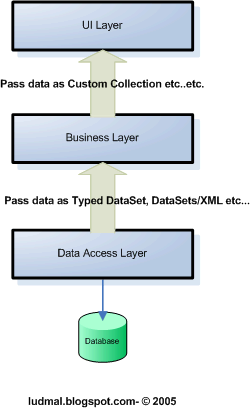
I have read so many articles went through so many blogs, had discussions with professional developers & this is what i got finally,(remember this is not about tierd architecture , this is about passing the data thorugh tiers..) any ideas???
September 27, 2005
Discussion About Microsoft Patterns & Practices
we just thought to have discussion about microsoft patterns & practices if you guys are interested go head & publish your thoughts to this post http://mahasen.blogspot.com/2005/09/talking-about-microsoft-patterns.html
September 26, 2005
Share your videos with Google
One of my colleagues just showed me another googles invention. Its still in beeta. But guys its really worth. You can share your videos over the internet..more.... Goto: http://video.google.com
September 23, 2005
Custom Objects with Web Services
Web Services are not .net specific. Most of them might think its something Microsoft invented. What Microsoft have done is they implemented a common standard. To create a web service in .net is really easy. But you should understand the concept behind it. You can find the public web services which available through Microsoft UDDI service.(http://uddi.microsoft.com/visualstudio/ )
So today im going to explain how to return a custom object through web service. I will explain the scenario from a simple diagram.( banks needs a valid telephone number to issue a credit card its a fact)

In this scenario Telephone Company is offering a web service to its partners to get the customer just by supplying customers telephone number.
Customer class:
public class Customer
{
public Customer()
{
//
// TODO: Add constructor logic here
//
}
string _name;
string _age;
string _company;
public string Name
{
get{return _name;}
set{_name = value;}
}
public string Age
{
get{return _age;}
set{_age = value;}
}
public string Company
{
get{return _company;}
set{_company = value;}
}
}
GetCustomer web service method which returns the customer object
[WebMethod]
public Customer GetCustomer()
{
//can be perform any database functions
Customer customer = new Customer();
customer.Name = "Ludmal de silva";
customer.Age = "25";
customer.Company = "E-Solutions";
return customer;
}
Now we can use this web service by simply adding a web reference to our project.(you guys should know how to add a web reference its really simple).
Finally you can get the customer object which returns from the web service. Code below.
//Customer object
CustomerService.Customer customer = new CustomerService.Customer();
//CustomerService object
CustomerService.Service1 myCustomerService = new CustomerService.Service1();
///Get the customer from the WebService
customer = myCustomerService.GetCustomer();
//Assigning the values to the UI
this.Label1.Text = customer.Name;
this.Label2.Text = customer.Company ;
this.Label3.Text = customer.Age ;
What I was trying to do is to give a basic idea about web services & to use the custom object with web services. I highly appreciate comments. (my writing skills might be poor...) But all the questions /comments are welcome.
So today im going to explain how to return a custom object through web service. I will explain the scenario from a simple diagram.( banks needs a valid telephone number to issue a credit card its a fact)

In this scenario Telephone Company is offering a web service to its partners to get the customer just by supplying customers telephone number.
Customer class:
public class Customer
{
public Customer()
{
//
// TODO: Add constructor logic here
//
}
string _name;
string _age;
string _company;
public string Name
{
get{return _name;}
set{_name = value;}
}
public string Age
{
get{return _age;}
set{_age = value;}
}
public string Company
{
get{return _company;}
set{_company = value;}
}
}
GetCustomer web service method which returns the customer object
[WebMethod]
public Customer GetCustomer()
{
//can be perform any database functions
Customer customer = new Customer();
customer.Name = "Ludmal de silva";
customer.Age = "25";
customer.Company = "E-Solutions";
return customer;
}
Now we can use this web service by simply adding a web reference to our project.(you guys should know how to add a web reference its really simple).
Finally you can get the customer object which returns from the web service. Code below.
//Customer object
CustomerService.Customer customer = new CustomerService.Customer();
//CustomerService object
CustomerService.Service1 myCustomerService = new CustomerService.Service1();
///Get the customer from the WebService
customer = myCustomerService.GetCustomer();
//Assigning the values to the UI
this.Label1.Text = customer.Name;
this.Label2.Text = customer.Company ;
this.Label3.Text = customer.Age ;
What I was trying to do is to give a basic idea about web services & to use the custom object with web services. I highly appreciate comments. (my writing skills might be poor...) But all the questions /comments are welcome.
September 22, 2005
Custom DataGrid with client side behavior
while i was digging into the massive microsoft MSDN site i found this interesting article about the data grid. Never thought a datagrid can do this much. Check the article at http://msdn.microsoft.com/msdnmag/issues/04/01/CuttingEdge/default.aspx im working on a article to show how to return a custom object through a web service. I will publish it tommorow. So stay tuned. ;)
September 21, 2005
Power of CSS
You will be amazed of the CSS possibilities. It can completely change the page's layout with no tables at all. CSS is a really a powerful technology for the UI designers. I just went through a site today (one my colleague refer me to this site) its dedicated site to CSS stuff...really cool. I think UI designers should know the real beauty of CSS for designing spectacular sites.
http://www.csszengarden.com/
http://www.csszengarden.com/
September 20, 2005
Using Web User Control
Note: Recommend Audience - Asp.net Beginner
Web user control is playing a major role in asp.net development. Its hardly possible to develop a application without web user controls. But most of developers are not using it properly. In this article I just thought to share some powerful features of web user control. Microsoft .Net framework is fully object oriented implementation. So we have to take advantage of it. We can learn lots of things by looking at the Microsoft class library. So lets start simple sample to show proper use of Web user control.
Scenario: We have to create 3(might be more) Registration forms in different formats. But the Mailing Address section is always stays the same. We need to accomplish this in minimum effort with a Web User Control in OOP manner.
Solutions: So lets start creating simple Web User Control name AddressUI;

In code behind of the AddressUI insert the below code
//AddressUI Properties
public string Street1
{
get {return this.txtStreet1.Text ;}
set {this.txtStreet1.Text = value;}
}
public string Street2
{
get {return this.txtStreet2.Text ;}
set {this.txtStreet2.Text = value;}
}
public string City
{
get {return this.txtCity.Text ;}
set {this.txtCity.Text = value;}
}
public string Country
{
get {return this.txtCountry.Text ;}
set {this.txtCountry.Text = value;}
}
public bool ContactMe
{
get {return this.chkContactMe.Checked ;}
set {this.chkContactMe.Checked = value;}
}
Now you can use this AddressUI control in any page u wanted. Giving u easily maintainable UI. Let me show you how u can use this control in your ASP.net pages.
Drag & drop the control into the page. You can access the controls property. Check the below code.
Declare the AddressUI control
protected AddressUI AddressUI1;
then access its properties, Add this code to a button click event.
Response.Write(AddressUI1.City + AddressUI1.Country );
your done. You can assign its properties to another objetecs properties.. no hassle doing Page.FindControl & no casting at all.
Web user control is playing a major role in asp.net development. Its hardly possible to develop a application without web user controls. But most of developers are not using it properly. In this article I just thought to share some powerful features of web user control. Microsoft .Net framework is fully object oriented implementation. So we have to take advantage of it. We can learn lots of things by looking at the Microsoft class library. So lets start simple sample to show proper use of Web user control.
Scenario: We have to create 3(might be more) Registration forms in different formats. But the Mailing Address section is always stays the same. We need to accomplish this in minimum effort with a Web User Control in OOP manner.
Solutions: So lets start creating simple Web User Control name AddressUI;
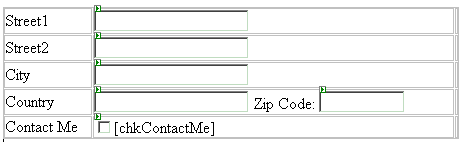
In code behind of the AddressUI insert the below code
//AddressUI Properties
public string Street1
{
get {return this.txtStreet1.Text ;}
set {this.txtStreet1.Text = value;}
}
public string Street2
{
get {return this.txtStreet2.Text ;}
set {this.txtStreet2.Text = value;}
}
public string City
{
get {return this.txtCity.Text ;}
set {this.txtCity.Text = value;}
}
public string Country
{
get {return this.txtCountry.Text ;}
set {this.txtCountry.Text = value;}
}
public bool ContactMe
{
get {return this.chkContactMe.Checked ;}
set {this.chkContactMe.Checked = value;}
}
Now you can use this AddressUI control in any page u wanted. Giving u easily maintainable UI. Let me show you how u can use this control in your ASP.net pages.
Drag & drop the control into the page. You can access the controls property. Check the below code.
Declare the AddressUI control
protected AddressUI AddressUI1;
then access its properties, Add this code to a button click event.
Response.Write(AddressUI1.City + AddressUI1.Country );
your done. You can assign its properties to another objetecs properties.. no hassle doing Page.FindControl & no casting at all.
Subscribe to:
Posts (Atom)