February 18, 2011

2 Week Challenge

It’s been a while that I haven’t posted anything. Busy work life is my usual BS. Anyway, the first month of the year was very tranquil and I was away from my computers most of the time. My New Year resolution was to take things easy, but realized without challenges life would be bored.

So I decided to start a 2 week challenge. I wanted to keep it short and simple initially, and then to come with more difficult and interesting challenges as I progress. Let see how it goes.

You can also start your own challenge for 2 weeks—if not for a month. For example learning a new programming language or learn to play guitar would be interesting.

December 30, 2010

API Design

My last technical presentation for the year 2010. The tech talk is about How to design API's. Please find the presentation slides and hope this helps.

December 22, 2010

How to manage your Code Repository

Managing a personal code repository is not that easy, especially when you have projects of all different technologies. I currently develop applications in Java, Apple & Microsoft. Being a Microsoft guy for a decade I recently moved into other development areas which is pretty interesting and keeps me very busy.

All so often I get this question -- how do I manage my code repository. So thought of writing a small post which might help someone.

I use code.google.com to manage all my projects. The projects I host in code.google.com are my personal projects and I really don’t mind sharing it with public. I use SVN as my source control system. For developers who do not want public access to their source code can use GITHUB paid version which is as similar to code.google.com.

Following is my main Project folder hierarchy;

APPLE
---- IPHONE
---- IPAD
---- MAC
GOOGLE
---- EXTENSIONS
---- APP_ENGINE
MICROSOFT
---- XWT
---- ASP.NET
---- WPF
---- WIN

All of the above projects source are managed by code.google.com. Since I develop for both Apple and Microsoft; I have to use both Mac and Windows OS also three different Development IDE’s -- Visual Studio, XCode and Eclipse.

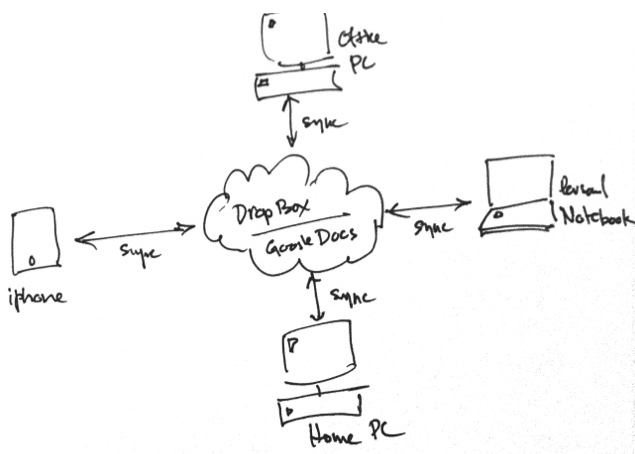
I use Ankh SVN plugh-in and Tortoise SVN for Visual Studio which is pretty awesome. For XCode and Eclipse I use Versions. All of the above folders are sync with my DropBox private folder, so that even if I don’t have my development PC--I can still continue my work from any PC. Also I have mirrored my local Project folder to a Portable HD. The following diagram will show you the overall setup.


I use Mozy.com for my weekly project backups, so my Projects are well secured from any disaster. I have pretty much the same setup for my other stuff as well. For example, Artworks, Video projects, Scanned docs and so forth.

The main idea behind this setup is to continue my work regardless of where I am. And by mirroring my code with multiple sources guarantee my code safety.

Hope this helps!

December 16, 2010

Software Design Principles & Patterns

Recently I've done a training session to my office colleagues on Software Design Principles & Patterns. I discussed on the most important design principles and design patterns. Hope it will be useful to you as well.

December 15, 2010

Gmail – the best example for iteration perfection

When Gmail initially released back in 2004, it was just a simple email system. By giving more storage and Ajax request processing technique made Gmail to gain attention from the users. But Gmail lack most of the functionalities which other email systems provided back then, such as folders or labels.

But today, Gmail is probably the best Web Application on the internet. Throughout the years Google engineers made the Gmail perfect by adding features— at least every month.

As developers, we typically experience the “Add More Features” syndrome. Rather than releasing to the market quickly we keep adding and adding more features to our app, eventually we loose the interest and the product was never released.

Release your app quickly to the market and also release features more often. Through development and release iterations makes your app perfect overtime.

December 8, 2010

iTunes Connect holiday shutdown

App Store submissions will be closed from 23 December to 29 December. Following is the official email from Apple. Also this only applies to Apple iOS developers.

iTunes Connect will be temporarily shut down from Thursday, December 23 to Tuesday, December 28 for the winter holidays. Access will resume on Wednesday, December 29.
During this shutdown, iTunes Connect will be unavailable. In addition, app releases and pricing changes which are scheduled to take place during the shutdown will be handled as follows:
All releases will not appear in the App Store until Wednesday, December 29. This includes apps scheduled to appear on the App Store for the first time as well as updates to existing apps.
Pricing changes will cause the app to become unavailable for purchase until Wednesday, December 29, at which point the app will become available at the new price. Please check to ensure you have not scheduled any price changes during this time.

Transformation

I still remember the days we wrote software and distributed in Floppy diskettes or CD’s. Back in those days web was merely bunch of static pages which most of the companies used to publish their company profiles.

But in the past few years’ things have changed immensely. People are connected to internet than ever before—we are in the process of transforming to a new technology era.

What does this mean ;

To Users :
People are connected to their loved ones than ever before—Social Networking. They were able to access their personal data such as photos from anywhere in the world.  Their productivity software is no longer limited to their desktop PC.

To Developers :
Developers have huge opportunities through various platforms. They no longer have to waste time on marketing or distributing their software. Apple App store, Windows marketplace, Google App Engine & Chrome App store reaches millions of user’s everyday.

November 29, 2010

The important of the Web browser


I could estimate that 90 percent of everything I do on a computer is now in a web browser. Coding is the only thing I don’t do using the browser. But for an example, my wife only uses the Web browser, and she’s a typical everyday computer user.

Web browse is the mostly used program in the recent years with the internet evolution and it is the most important software program of all. Since the focus has been on to the Browser—Google has made a wise decision to release a Computer Operating System (OS) which only focuses on the web browser. Most probably you can see an early preview of their OS in next few weeks.

So it's time now to seriously think about the cloud computing. 

November 25, 2010

Get Color from Hex values in Silverlight

Since Silverlight does not support System.Drawing.ColorTranslator the following method can be used to convert Html Color values to a Color object.


public static Color GetColor(string htmlColor) {
            return Color.FromArgb(255,
                Convert.ToByte(htmlColor.Substring(1, 2), 16),
                    Convert.ToByte(htmlColor.Substring(3, 2), 16),
                    Convert.ToByte(htmlColor.Substring(5, 2), 16)
            );
        }

November 18, 2010

Anywhere, anytime on any device – documents

It was Microsoft’s vision to connect people—anywhere, anytime on any device. However after a decade of their .Net vision, people are connected to each other more than ever—primarily using Social Networks (i.e. Facebook, Twitter etc).

But this post isn’t about Social Network. It’s about taking your documents online or to the cloud, where you can access them from anywhere, anytime on any device. This is the first in a series of posts on how to take your personal computer to the cloud, such as photos, videos, projects, emails etc.

Generally I use four computing devices;
  • Office PC
  • Home PC
  • Personal Notebook
  • Mobile (iPhone)
I write articles, books and business proposals and sometimes I have to work on them regardless of where I am. For example, I could write an article at home and would like to proof read it while I’m travelling. So I use the following setup (please refer to the following diagram) within my four computing devices. More importantly I’m completely independent from those devices, which means I have access to any of my documents from anywhere.


Steps to setup your devices; 
  • Download and install Dropbox(http://www.dropbox.com) in your Home, Office and Personal computers. Also download Dropbox for iPhone.
  • Download and install OffiSync (http://www.offisync.com) in your Home, Office and Personal computers. 
  • Register for Google account (if you don’t have any), this is to use Google docs for your documents. 
  • Create document repository in DropBox’s Private folder—this is where you save your documents.
Let’s create a document and access it from anywhere.
  • Create MS word document and enter some text. 
  • Save the document in DropBox’s Private folder. 
  • Also save the same document to Google docs using OffiSync MS Word plug-in.
  • Now change your computers and browse the relevant folders and your document has been synced with all the computers (Office, Home and Personal).
  • Open Google docs in your iPhone and you can now edit the same document while you are travelling. 
  • More importantly you can access the same document from anywhere—you only required a computer with Internet access. 
I still DO NOT save documents which contains Bank details or Passwords using this method. So I suggest you should do the same. 

Hope this helps and stay tuned for the next post— Anywhere, anytime and on any device – Photos.

November 17, 2010

Using Predicate to filter NSMutableArray

To filter NSMutableArray you could use Predicates in Objective-C. This will returns a new array which matches to the given predicate.


NSMutableArray *list =
    [NSMutableArray arrayWithObjects:@"Mark", @"Balmer", @"Bill", @"Steve", nil];
NSPredicate *listBPredicate = [NSPredicate predicateWithFormat:@"SELF beginswith[c] 'b'"];
NSArray *namesBeginB = [list filteredArrayUsingPredicate:listBPredicate];

NSPredicate *listContainsPredicate = [NSPredicate predicateWithFormat:@"SELF contains[c] 'e'"];

NSArray *namesWithE = [list filterArrayUsingPredicate:listContainsPredicate];

listBPredicate will return names which starts in "b" and listContainsPredicate will return all the names which has letter "e".

November 15, 2010

How to save User preferences in iPhone app

Saving user preferences in iPhone app is fairly easy. It work as key/value pairs in NSUserDefaults object.


To save whether user prefers sounds on or off in your application you can do it as the following code block.

[[NSUserDefaults standardUserDefaults] setBool:YES forKey:@"soundsOn"];

And to retrieve the sounds preferences value;


BOOL soundsOn = [[NSUserDefaults standardUserDefaults] boolForKey:@"soundsOn"];

October 30, 2010

iPhone keeps vibrating and no response

My iPhone suddenly started vibrating for no reason and screen was shut down.

Solution:
Press and hold Lock and Home key for few seconds to reset.

Reason:
I have no idea why this happend.

October 27, 2010

Gmail like User message control in ASP.NET

(Cross-posted on the Extensible-web)


MessageControl is an ASP.NET control which let you create user message like Gmail Application.


This control is part of the XWT toolkit. Please download and read the MessageControl.

Also read the  Code Project article about MessageControl at the following location.

October 22, 2010

PageManager control

I have written a simple article about my XWT toolkit. Please read through and download the samples.

http://www.codeproject.com/KB/webforms/aspnet-pagemanager.aspx

October 20, 2010

jQuery 1.4.3 released

(Cross-posted on the Extensible-web)

jQuery 1.4.3 final version is released. There are some significant enhancement has been done for the entire library, mainly in the performance. Following are some of the new features of jQuery 1.4.3
  • CSS Module Rewrite – Entire CSS Module has been re-written for extensibilit. You can write custom CSS plug-in now to extend the .css() and .animate() functions.
  • Data – There are some enhancement on this area as well. HTML 5 data-attributes, JavaScript object and Events are included in those enhancements.
  • Traversing - The performance of nearly all the major traversal methods has been drastically improved. For example .closest(), .filter() (and as a result, .is()), and .find() have all been greatly improved.
  • Ajax - A few new Ajax features have added. This should be advantage for plugin authors.
  • Events - A convenient shortcut for binding a function that does nothing but return false (preventing the default action and stopping the event bubbling).
  • Effects - All animate methods now support easing. A new property that exposes the rate at which all effects fire (in milliseconds – defaults to 13) also added.
There are much more enhancements for the new jQuery library. You can read in more detail from the following URL.

October 15, 2010

Extensible-Web Toolkit(XWT) RC1 released

Extensible-Web Toolkit(XWT) RC1 released. The toolkit provides simple web controls, framework library for ASP.NET development and built-in integration for jQuery. It will also provide some useful utilities for Web Application developers.

How to create Chrome Notifications

(Cross-posted on the Extensible-web)

Chrome supports Webkitnotifications and Google has done a great job with their notifications for Gmail. This example shoes how to create a recurring notification using JavaScript timer and webkitnotification object.


In order to create a notification the user must first allow notification in their browser. Click on “Allow notification” button in the ASP.NET sample and the permission will be granted.

Following code block will show you how simple is to create a notification object and show it on browser.

notify = window.webkitNotifications.createNotification('iconUrl', 'Extensible-web latest article', 'http://www.extensible-web.com');
notify.show();


Download the full source code.

September 29, 2010

SEO Starter Guide

It's been a while since I haven't posted anything useful. So here is a very good one for Web masters and developers.
Download the Google's SEO guide here